
Writing a good page is only half the job. Before drafting, you need a topic people actually search for. Afterward, you still have to edit for clarity, tighten the metadata, and check the technical details that help a page get found. Free SEO tools for content writing and copywriting can take much of that repetitive work off your plate.
This guide walks through the 26 free tools on CopyWriterContent.com, grouped by the job each one does, and shows how they fit into a real workflow. One caution first: tools assist your judgment; they do not replace it. No score, checklist, or generator can promise rankings, traffic, indexing, or conversions. Search performance depends on many factors, as Google Search Central’s documentation explains.
What Are Free SEO Tools for Content Writing and Copywriting?
An SEO tool helps search engines find and understand a page: keyword ideas, titles, meta descriptions, URLs, and indexability checks. A writing tool improves the text itself, including readability, word count, passive voice, and filler words. A copywriting tool supports persuasion, such as headlines, value propositions, calls to action, and product descriptions.
The categories overlap. A headline must work for readers and match a search query. A meta description is both a technical element and a small piece of ad copy. If you are new to the craft, our SEO copywriting guide covers the fundamentals, and this article shows which tools support each step.
Why Writers and Copywriters Need These Tools
Good content starts with search intent, meaning what the reader wants when they type a query. Keyword tools reveal how your audience phrases a problem. Editing tools catch what tired eyes miss: long sentences, passive voice, and filler. Structure tools turn a topic into a content brief. Metadata tools keep titles and descriptions consistent, and conversion tools help you draft messaging quickly before you refine it.
For freelancers and small teams, free tools also remove friction. There is no subscription to justify before you have clients. Writers serving the USA, Canada, Australia, France, Germany, and the UK should remember that wording and demand differ by country, so treat any suggestion as a starting point to verify. Understanding where SEO writing ends and general content writing begins also helps, which is the focus of our comparison of SEO copywriting vs content writing.
26 Free Tools on CopyWriterContent.com, Organized by Task
The tables below give a quick overview. The sections after them add detail, limits, and examples.
Copywriting Tools (16)
| Tool | Main use |
|---|---|
| Headline Analyzer | Review headline clarity and relevance |
| Meta Description Generator | Draft search-result descriptions |
| Value Proposition Generator | State what you offer and why it matters |
| Elevator Pitch Generator | Write a short pitch |
| CTA Generator | Suggest calls to action |
| USP Generator | Define unique selling points |
| Product Description Generator | Draft product copy |
| Landing Page Copy Generator | Draft landing page copy |
| Word Counter | Check length requirements |
| Readability Checker | Find hard-to-read passages |
| Case Converter | Fix heading capitalization |
| Smart Text Generator | Produce draft text to refine |
| YouTube Tag Generator | Suggest video tags |
| Power Words Highlighter | Mark persuasive words |
| Passive Voice Checker | Spot passive sentences |
| Filler Word Checker | Spot unneeded words |
SEO and Content Writing Tools (10)
| Tool | Main use |
|---|---|
| Keyword Generator | Find related and long-tail keyword ideas |
| SEO Title Generator | Suggest page-title options |
| FAQ Generator | Draft question-and-answer content |
| Blog Outline Generator | Organize headings and sections |
| Blog Topic Idea Generator | Turn a niche into post ideas |
| URL Index Checker | Run an indexability checklist |
| Keyword Density Checker | Spot repeated phrases |
| Meta Tag Analyzer | Audit title, description, and social tags |
| SEO Slug Generator | Create short, readable URLs |
| Image Alt Text Generator | Draft alt text options |
Keyword Research and Content Planning
The Keyword Generator turns one seed topic into related keywords and long-tail ideas, with an industry niche and country selector. Each result carries a relevance percentage. Be clear about its limits: the tool draws on a free language database, so the percentage shows how closely a term matches your topic, not search volume or difficulty. For demand estimates, check Google Keyword Planner.
The Blog Topic Idea Generator and Blog Outline Generator then turn a niche into a structured plan.
Hypothetical example: A freelance writer enters “remote work tools,” picks a topic from the idea list, and builds an outline with H2s for tool categories, a comparison section, and questions to answer.
Headlines, Titles, and Meta Descriptions
Use the Headline Analyzer, SEO Title Generator, and Meta Description Generator together. Google may still show its own snippet. The Meta Tag Analyzer works differently: you paste a page’s HTML, and it checks the title, description, canonical, viewport, Open Graph, and Twitter Card tags, then shows a completeness score and search preview.
Hypothetical example: “Tips for Better Blog Posts” is vague. “7 Edits That Make Blog Posts Easier to Read” promises something specific.
Content Editing and Readability
The Readability Checker flags hard-to-read passages. The Passive Voice Checker and Filler Word Checker highlight constructions that often weaken sentences. Treat anything the Smart Text Generator creates as raw material and edit it fully.
Hypothetical example: “The report was reviewed by the team” becomes “The team reviewed the report.”
Keyword and On-Page SEO Checks
The Keyword Density Checker is a review aid, not a ranking formula. There is no universal ideal density.
The URL Index Checker needs a careful explanation: no browser tool can query Google’s private index, so it gives you links for a site: search and Search Console’s URL Inspection tool, plus a readiness checklist covering noindex tags, robots.txt blocks, sitemaps, and internal links. Confirm real status in Google Search Console.
The Image Alt Text Generator works from your description of an image and an optional keyword and recommends an empty alt attribute for decorative images. None of the 26 tools measures page speed, so use Google PageSpeed Insights if load time concerns you.
Copywriting and Conversions
If you need a framework before using the value proposition or USP tools, read our guide to writing a value proposition statement. For page structure, see our landing page copywriting formula.
Hypothetical example: A button reading “Submit” could become “Get my free quote,” which tells visitors what happens next.
Content Formatting and Promotion
The Power Words Highlighter shows where persuasive language clusters so you can decide whether it is overdone. The YouTube Tag Generator matters only if you publish a video.
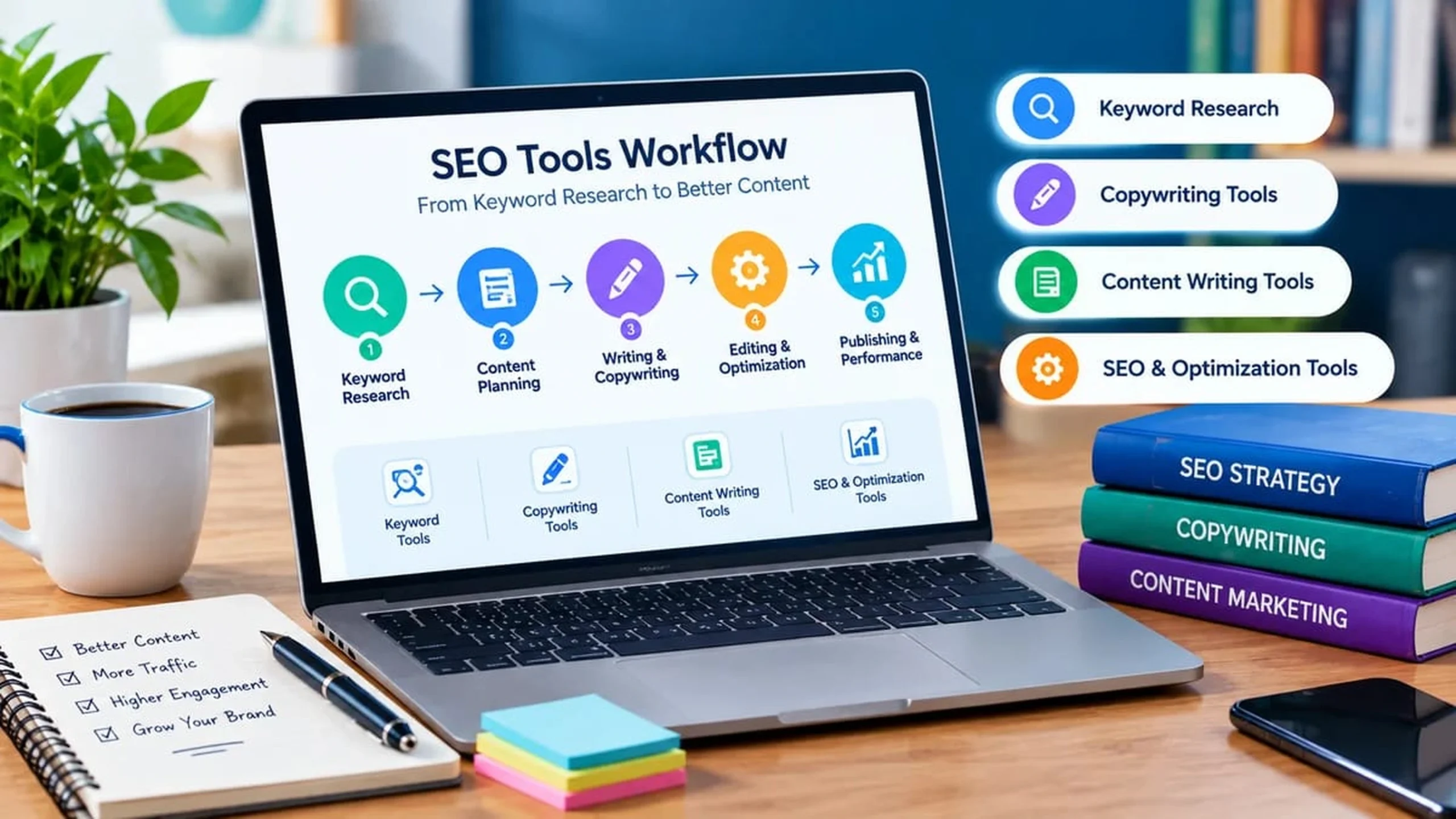
How to Use These Tools in a Practical Writing Workflow
- Find a topic and keyword. Use the Keyword Generator and Blog Topic Idea Generator, then verify demand elsewhere.
- Understand the audience and intent. Ask what the reader wants to do, learn, or decide.
- Create an outline. Build headings with the Blog Outline Generator.
- Draft the content. Write for the reader first.
- Improve headlines and metadata. Test headline, title, and description options.
- Review readability, filler, and passive voice. Edit until each paragraph is easy to scan.
- Check keyword use and page elements. Look for repetition and confirm the slug, title, and description.
- Improve alt text and structure. Describe images accurately and check your heading hierarchy.
- Review manually. Read the whole page as a visitor would, and check every fact.
- Publish and monitor. Track performance over time rather than expecting instant results.
Tools help with specific tasks. They do not guarantee rankings or conversions.
Free SEO Tools vs. Paid SEO Platforms
Free tools are often enough for writing, editing, and on-page checks. Paid platforms such as Ahrefs and Semrush add research and reporting, including keyword volume and difficulty data at scale, rank tracking, backlink analysis, and competitor research. They are optional, not required purchases. Both also offer limited free options: see Ahrefs’ free SEO tools and Semrush’s free tools. Semrush also publishes a roundup of free SEO tools, and free plans there limit how many searches you can run each day.
How to Choose the Right Tools for Your Needs
- Beginners: Start with the Keyword Generator, Readability Checker, and Meta Description Generator. Our copywriting guide for beginners explains the basics.
- Freelance writers: Add the outline, passive voice, and filler word tools to speed up editing.
- Copywriters: Focus on the headline, CTA, USP, and landing page tools.
- Bloggers: Combine topic ideas, outlines, slugs, and alt text.
- Small businesses: Use product description, value proposition, and meta tag tools.
- Content marketing teams: Standardize a checklist, then add paid research tools if reporting needs grow.
Common Mistakes to Avoid When Using SEO Tools
- Keyword stuffing. Repeating a phrase to satisfy a counter makes writing worse.
- Publishing unedited generated text. Always verify, rewrite, and add your own expertise.
- Treating scores as guarantees. A score is a prompt for review, not a verdict on quality.
- Writing for tools instead of readers. Clarity wins.
- Overusing persuasive words. Too many power words sound like hype.
- Ignoring search intent. A perfectly optimized page still fails if it does not answer the query.
Emerging SEO and Content Optimization Topics
These topics come from sources reviewed for this article. They are not trend rankings, and Google Trends shows relative interest, not search volume.
- Google AI Overviews and AI Mode. Google’s documentation says no extra requirements or special optimizations exist for these features. A page must be indexed and eligible to show with a snippet, and standard SEO fundamentals still apply. Act: keep pages crawlable, helpful, and text-based. Source: Google’s guide to AI features and your website.
- Measuring AI search visibility. Ahrefs suggests combining Search Console, other free webmaster tools, and regular manual checks of AI assistants, keeping a log over time. Google says AI feature traffic is included in Search Console’s Performance report. Act: run a monthly check and record the results. Source: Ahrefs’ SEO and AI search monitoring guide.
- Question-based and conversational keywords. Semrush’s January 2026 roundup highlights question-focused keyword views and tools for conversational queries. Act: use long-tail ideas from the Keyword Generator, then build answers with the FAQ Generator.
- Regional keyword comparison. Wording and interest vary by country. Act: compare terms across the USA, Canada, Australia, France, and Germany in Google Trends, and treat results as directional.
- Human review of AI-assisted drafts. Google publishes guidance on people-first content and on using generative AI. Act: treat generated text as a draft, then add accuracy, experience, and original insight.
Frequently Asked Questions
What are free SEO tools for content writing and copywriting?
They are online tools that help with keyword ideas, structure, editing, metadata, on-page checks, and persuasive copy, without a paid subscription.
Which free SEO tools are best for content writers?
Start with keyword, outline, readability, passive voice, filler word, and meta description tools. The best choice depends on your task.
How can copywriters use SEO tools?
Use them to check headlines, test titles and descriptions, avoid repetition, and make sure persuasive copy stays clear and relevant to the search query.
Are free SEO tools enough for beginners?
Often yes, for writing and on-page work. Paid platforms matter later if you need volume data, rank tracking, or competitor research.
How can I find keywords for a blog post for free?
Generate ideas with a keyword tool, then check demand in Google Keyword Planner and compare interest in Google Trends. Choose terms that match your reader’s intent.
How can I optimize a blog post without keyword stuffing?
Write naturally, use the main phrase where it fits, cover related subtopics, and review repetition. Edit for readers first.
Can free SEO tools help improve Google rankings?
They can help you improve content and fix on-page issues, but they cannot guarantee rankings. Rankings depend on many factors.
What is the difference between SEO writing tools and copywriting tools?
SEO writing tools support discoverability: keywords, titles, slugs, and indexability checks. Copywriting tools support persuasion: headlines, value propositions, and calls to action. Many tasks need both.
Conclusion
The most useful free SEO tools for content writing and copywriting do not write the article for you. They shorten research, expose weak spots, and keep your checks consistent. Start with the tools that match your biggest bottleneck, then add others as your workflow grows, always finishing with your own editorial review. You can explore all 26 free tools on CopyWriterContent.com and use them as one connected toolkit.

- I’m Saba Sheikh, a self-employed copywriter and SEO content writer specializing in website copy, landing pages, SEO blog writing, product descriptions, and email copywriting. I create search-optimized, conversion-focused content that helps startups, small businesses, and eCommerce brands grow their online presence and attract more customers.